
All website hosting plans include a FREE Drag and Drop website builder
Cannot send emails using Outlook Express
The most common reasons for not being able to send emails through Outlook Express are incorrect settings or your ISP is blocking access to port 25
Use the correct Mail Client settings:
- Incoming mail server (POP3/IMAP server): mail.yourdomain.com
- Outgoing mail server (SMTP server): mail.yourdomain.com
- Username: the full e-mail address like email@yourdomain.com
- SMTP authentication must be enabled for the login to be successful.
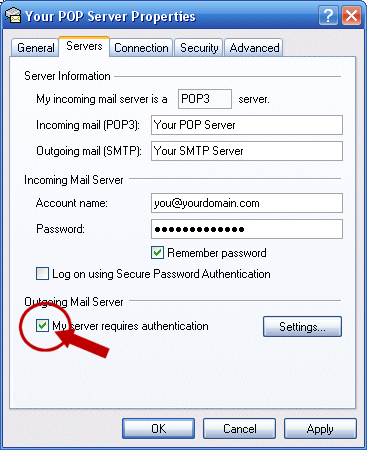
The most common mistake is to leave "My SMTP server requires authentication checkbox" unchecked. This option should always be enabled, since UKTnet servers require such authentication. Please find below how to enable the SMTP authentication for your Outlook express mail client:
From the Tools menu select Accounts. The Internet Accounts box appears. Select the Mail tab. Your email account appears. Select the appropriate email account by clicking on its name and click the Properties button on the right. Then under the Outgoing Mail Server section check the box My server requires authentication. Do NOT check the box next to Log on using Secure Password Authentication.
Check connection to port 25
The standard port usually used for SMTP connection is port 25.
Some broadband ISP's block this port to prevent unlawful use such as bulk emailing or spamming etc.For detailed instructions how to check your connection to port 25 with a Windows or MAC computer please refer to our What is SMTP? article
Also see our Video Tutorial on Setting Up Outlook Express
Setting up an email account in Outlook Express (movie)
